Card terminals, and the question nobody asks.
Pick the shape before the model. Then ask what PCI PTS version the device is approved under and when that approval expires, because a terminal is a four-to-seven-year decision and approvals run out.
What this page settles.
Three questions, in the order most people ask them.
Pick the shape before the model
Terminal shopping goes wrong when it starts with a model name. It should start with where you stand when you take money, because that decides the shape, and the shape eliminates most of the catalogue before you compare a single specification.
A fixed counter wants a countertop unit on ethernet. It is the most reliable way to take a card — no battery, no signal, no pairing — and for a shop, a bar or a pharmacy it should be the default.
Taking payment away from the counter wants a handheld with its own cellular connection and a battery. Table service, a trade at a customer’s house, a market stall, a second till on a busy Saturday.
A point-of-sale system wants an integrated reader, so the till sends the amount across and nobody types $45.00 as $4.50.
A mobile trade with small tickets may want no hardware at all: a phone reads contactless cards at card-present rates with nothing to charge separately. Tap to pay on a phone.
The longer version of this decision.
What each one publishes
These are the devices we sell and support, with every figure quoted from the manufacturer’s own product page. Where a manufacturer does not publish something, it is left out rather than borrowed from a reseller listing — which is why these entries are uneven. The unevenness is the manufacturers’, not ours.
Handhelds
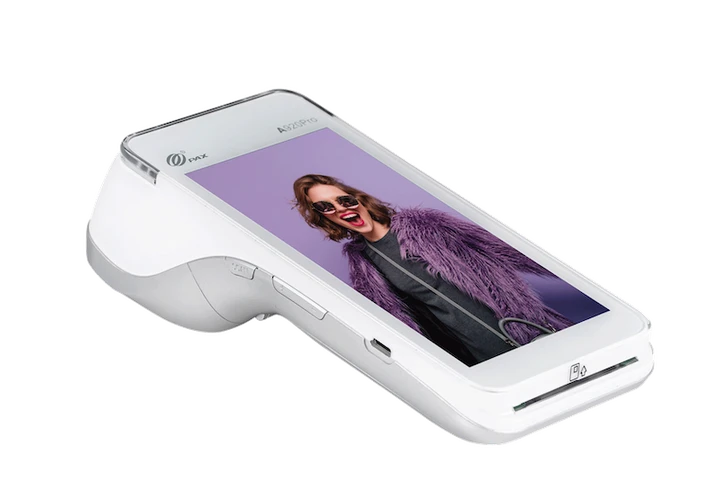
- PAX A920 Pro (PAX) — Type: Handheld. Operating system: PAXBiz, powered by Android. Connectivity: Wi-Fi, 4G LTE, Bluetooth. Battery: 5150mAh / 3.7V rechargeable. Printer: Thermal, speed not published. Card reading: Chip and PIN, magnetic stripe, contactless (NFC), QR code. 5MP rear camera; optional built-in infrared barcode scanner.
- PAX A920MAX (PAX) — Type: Handheld. Operating system: Android 10. Screen: 6” HD+ touch screen. Connectivity: 4G, dual-band Wi-Fi, Bluetooth 5.0. Printer: 80mm/sec, 40mm paper roll outer diameter. Card reading: NFC contactless, chip, swipe, QR code. 5MP rear camera with flashlight; USB-C OTG; 6-pin pogo.
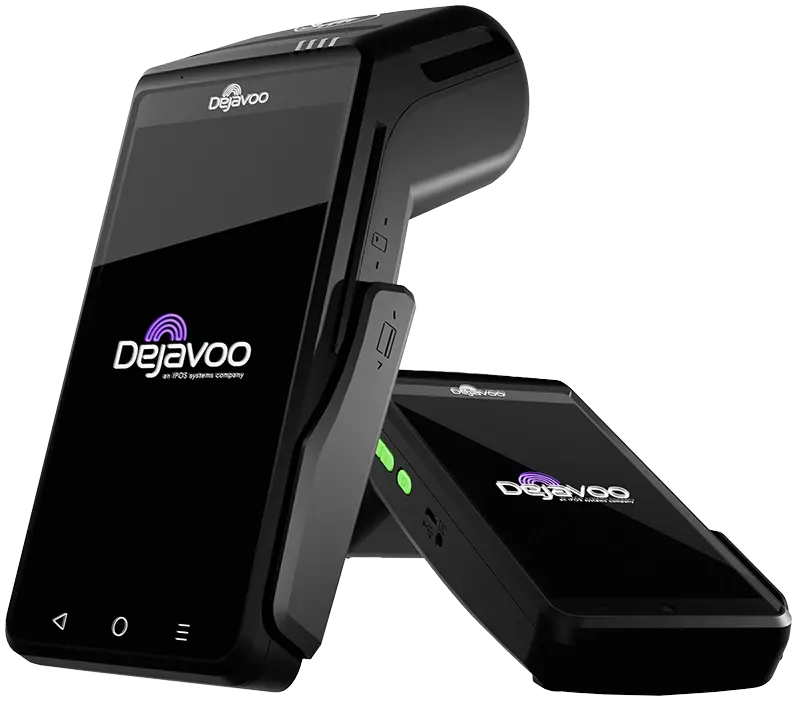
- Dejavoo QD2 (Dejavoo) — Type: Handheld. Operating system: Android 12. Screen: 5.5” colour LCD touchscreen. Connectivity: Dual-band Wi-Fi (2.4/5GHz), 4G/LTE, GPRS/GSM. Battery: 7.2V / 2600mAh. Printer: High-speed 58mm thermal. Card reading: EMV chip, contactless/NFC, mobile wallets. PCI PTS: PCI PTS 6.0. Rear 5MP camera, optional front 5MP or 8MP. Dimensions published but identical to the QD4’s, so omitted here.
- Valor VL110 (Valor PayTech) — Type: Handheld. Screen: 3.5” touchscreen. Connectivity: Wi-Fi and GPRS listed; the page also mentions 4G options. Battery: 4.2V / 2100mAh. Card reading: Tap, dip and swipe. PCI PTS: PCI PTS 5.x.
Countertop
- PAX A80 (PAX) — Type: Countertop. Operating system: Android. Screen: 4” HD touchscreen. Connectivity: Ethernet, Wi-Fi, Bluetooth, optional 4G. Battery: Optional battery backup; capacity not published. Printer: Thermal, speed not published. Card reading: EMV chip, magnetic stripe, NFC contactless. PCI PTS: A PCI 6 data sheet is linked from the page. Physical keypad.
- Dejavoo QD4 (Dejavoo) — Type: Countertop. Operating system: Android 12. Screen: 5.5” colour LCD touchscreen. Connectivity: Dual-band Wi-Fi (2.4/5GHz), Ethernet. Battery: Mains powered, 5V 2A adapter. Printer: High-speed 58mm thermal. Card reading: EMV L1 and L2 (ISO 7816), magnetic stripe (ISO 7811 triple track), contactless, mobile wallets. PCI PTS: PCI PTS 6.0. USB Type-C OTG and USB 3.1 HS. Dimensions published but identical to the QD2’s, so omitted here.
- Dejavoo Z11 (Dejavoo) — Type: Countertop. Operating system: Linux; version not published. Screen: 3.5” colour LCD touchscreen. Connectivity: Ethernet, Wi-Fi 2.4GHz. Printer: 2.25” x 80ft paper, 4 inches per second. Card reading: EMV L1 and L2 (ISO 7816), magnetic stripe triple track, NFC. PCI PTS: PCI PTS v4. 7.5 x 3 x 3 inches, 0.77 lbs.
All read on 2026-10-08. Specifications change without notice, and every one of these pages says so.
Prices are deliberately absent. Terminal pricing is set by whoever sells you the device, not by the manufacturer, and the same model can be a few hundred dollars outright or several thousand over a four-year lease. That is a contract question rather than a hardware one. Buy or lease.
The PCI version, which nobody mentions
Every payment terminal is approved against a version of the PCI PTS standard — the security requirements for the device itself — and those approvals expire. A device approved under an older version of the standard is closer to the end of its approved life than one approved under the current version, regardless of how new the unit in the box is.
Look at the range in the list above. Among the devices whose manufacturers publish it, the versions span several generations of the standard. That is not a judgement on any individual device — plenty of older-standard terminals work perfectly well today — but it is the single most useful question nobody asks a hardware salesperson:
“What PCI PTS version is this device approved under, and when does that approval expire?”
It matters because the answer tells you how long the device is actually good for. Buying a terminal is a four-to-seven-year decision, and buying one near the end of its approval window means replacing it sooner than you planned — which is particularly unwelcome if you financed it over 36 or 48 months. Equipment lease fees.
The manufacturers that publish the version on the product page are doing you a favour. The ones that do not will answer if asked.

What the spec sheet does not tell you
Five things that decide whether a terminal is right for you, none of which appear in a specification table.
Whether it is locked to a processor. Most terminals are deployed locked to whoever sold them, which means changing processors means buying new hardware. Ask before you buy, not after. Can I keep my terminal.
Whether you own it. “Free” hardware is almost always a lease, usually non-cancellable, usually with a third-party finance company, and it does not end when you leave the processor. A $79 a month lease over 48 months is $3,792 for a device worth a few hundred dollars. Buy or lease.
What happens when the connection drops. Offline mode means accepting payments nobody has authorised, and the declines are your loss. A cellular fallback is the better answer and costs a few dollars a month. Offline mode.
What it does to your PCI scope. A standalone terminal talking directly to the processor keeps card data out of your systems entirely and earns you one of the shortest questionnaires. One on your network does not. Which SAQ do I need.
Whether contactless is actually switched on. It frequently is not, on hardware that supports it. A tap is faster and sits in the best interchange treatment, so a reader with contactless disabled is costing money on every sale. The EMV liability shift.
Questions to ask before you buy
Seven, and the first three are worth more than the whole specification table.
Am I buying this or leasing it, and what is the total? Monthly figures hide four-figure totals.
Is it locked to your processing, and what does it cost to unlock or replace?
What PCI PTS version is it approved under, and when does that expire?
What is the connection, and what is the fallback? Ethernet for a counter, cellular for anything mobile, and something for when the first one fails.
Is contactless enabled out of the box?
What happens if it breaks on a Saturday? Swap time, loan units, and whether there is a protection plan and what it costs.
Can it be re-injected for another processor later? Terminals using point-to-point encryption carry keys specific to one platform, and moving them means re-injection, which costs money and takes the device away for a few days. Tokenization and P2PE.
What we charge
Interchange + 0.50% + 10¢ in person, interchange + 0.75% + 25¢ keyed, with no contract, no monthly fee and no monthly minimum. We sell hardware outright and we do not lease equipment.
We sell and support PAX, Dejavoo, Valor and Clover devices, and we are paid on the processing rather than on the box — which is why there is no version of this page that recommends the most expensive terminal. Tell us where you stand when you take money and what your internet is like, and we will tell you which shape you need, including when the answer is a phone and no hardware at all.
While we are on the subject
Which card terminal is best?
There is no single answer. A fixed counter wants a countertop unit on ethernet; a mobile trade wants a cellular handheld; a business with a point-of-sale system wants an integrated reader. The shape decides more than the model does.
Why are there no prices on this page?
Because terminal pricing is set by whoever sells you the device, not by the manufacturer. The same model can cost a few hundred dollars outright or several thousand over a four-year lease.
What is PCI PTS and why does the version matter?
It is the security standard a payment terminal is approved against, and approvals expire. A device approved under an older version is closer to the end of its approved life, which matters if you are financing it over three or four years.
Can I move a terminal to a different processor?
Only if you own it, it is not locked, and the new platform supports the model — and it may need its encryption keys re-injected. Ask before you buy rather than when you want to leave.